
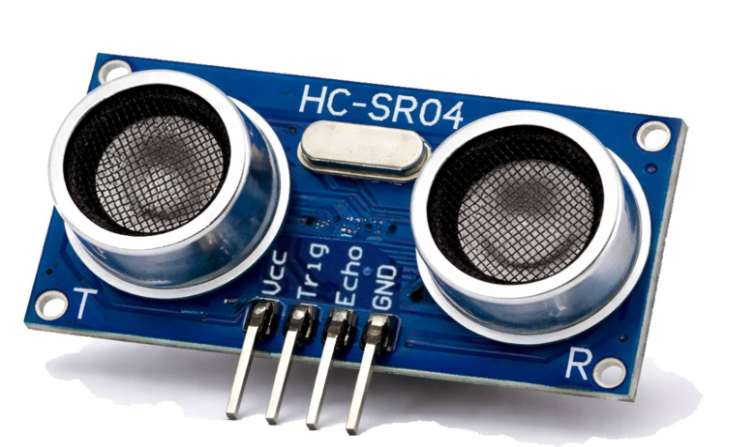
Bats do it. Submarines do it. And now your STM32 is going to do it too measure distance using sound.
In this experiment, you will interface an HC-SR04 ultrasonic sensor with an STM32 Nucleo board to measure the distance of an object. The sensor sends a short burst of ultrasonic waves and measures the time taken for the reflected sound to return. The STM32 then uses this time to calculate the distance and displays the result in centimetres through UART.
This is the same basic principle used in applications such as vehicle parking sensors, obstacle detection, and distance measurement systems.
In short : Send -> Wait for Echo -> Measure Time -> Calculate Distance.
Learning Outcomes:
After completing this experiment, user can understand:
- How an ultrasonic sensor works
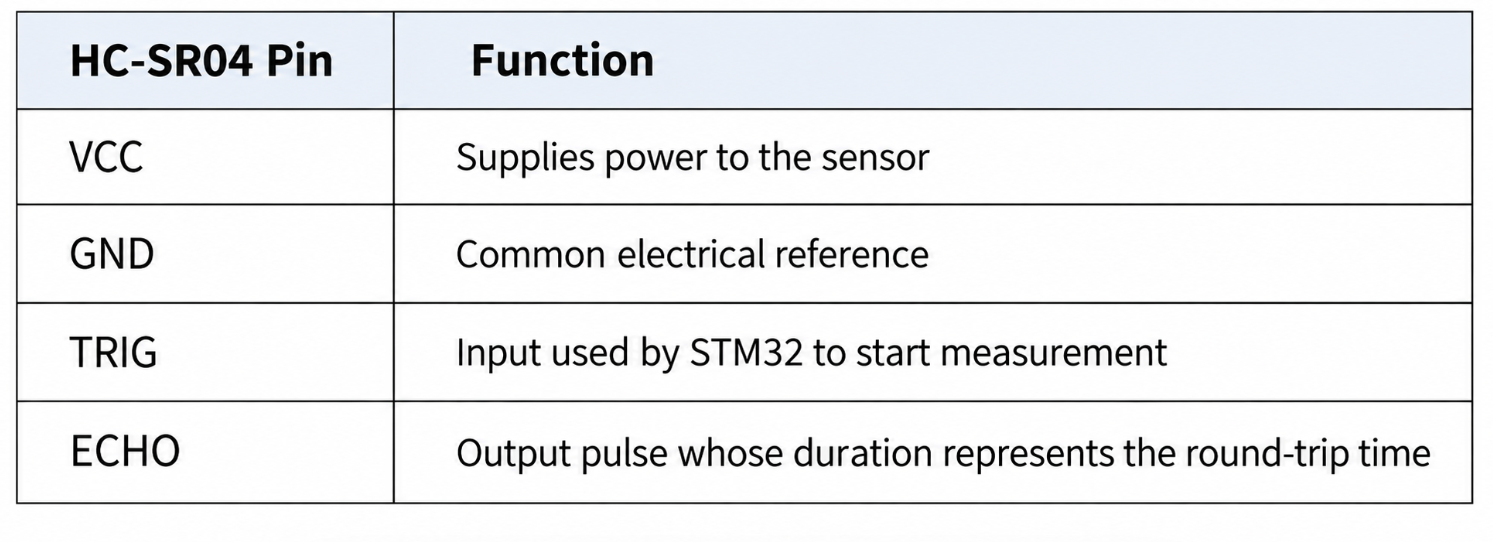
- TRIG and ECHO signals
- GPIO configuration in STM32
- Measuring pulse width
- Using timers for accurate time measurement
- Calculating distance from time-of-flight
- Sending sensor data through UART
HW/SW Parts Required
Hardware
- STM32 Nucleo-F070RB development board
- HC-SR04 ultrasonic distance sensor module
- Breadboard and jumper wires
- Micro-USB cable
- PC with PuTTY
Software
- STM32CubeMX (standalone)
- STM32CubeIDE
- ST-LINK USB driver
- PuTTY, or an equivalent serial terminal app
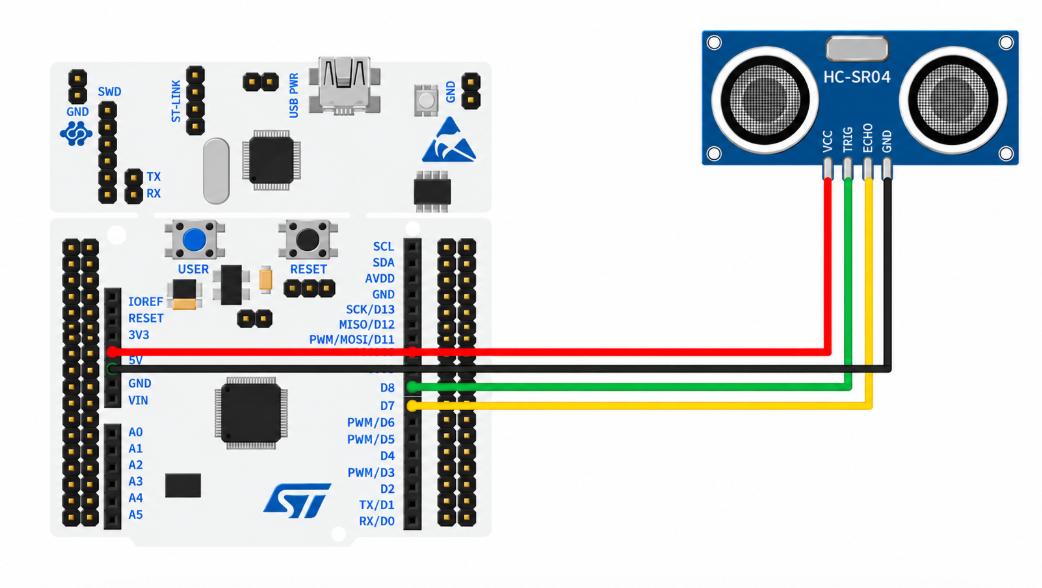
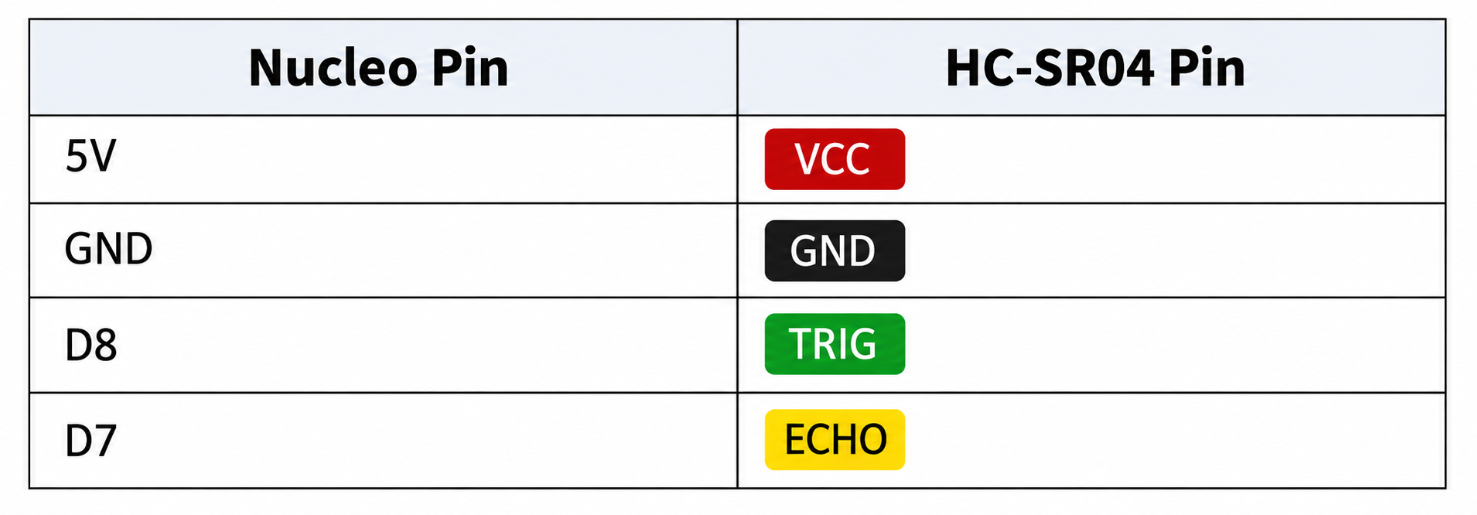
Connection Details
Sensor Details
|
Parameter |
Specification |
|
Power Supply |
5V DC |
|
Working Current |
15 mA |
|
Working Frequency |
40 kHz |
|
Maximum Range |
4 meters |
|
Minimum Range |
2 cm |
|
Measuring Angle |
15° |
|
Resolution |
0.3 cm |
|
Trigger Input Signal |
10 µS TTL pulse |
|
Echo Output Signal |
TTL pulse proportional to the distance range |
|
Dimensions |
45mm x 20mm x 15mm |
Let me explain this one the way I actually picture it in my head: imagine shouting toward a wall in an empty canyon and timing how long it takes for the echo to come back. The HC-SR04 does exactly that, except instead of shouting with your voice, it "shouts" using sound waves at 40 kHz, well above the roughly 20 kHz upper limit of human hearing, so it's completely silent to us but very audible to the sensor's own receiver.
Physically, the module has two round silver discs on its front: one is a transmitter (a piezoelectric crystal that vibrates rapidly when you apply a voltage pulse to it, pushing out a burst of ultrasonic sound waves), and the other is a receiver (an identical piezoelectric crystal, but running in reverse, incoming sound wave vibrations squeeze the crystal and generate a tiny electrical signal). Your microcontroller sends a 10 microsecond HIGH pulse on the Trigger pin, which tells the sensor to fire off a burst of exactly 8 pulses of 40 kHz sound. The sensor then raises its Echo pin HIGH the instant the sound leaves, and holds it HIGH until the reflected sound wave comes back and is detected by the receiver crystal.
The math that turns this into a distance is simple, and it's the same time-of-flight principle used in radar: distance = (time × speed of sound) / 2. You measure the Echo pin's HIGH duration in microseconds (how long the round trip took), multiply by the speed of sound in air (about 343 meters per second, or conveniently close to 0.0343 cm per microsecond), and divide by 2 because the sound traveled to the object and back, a round trip, not a one-way trip. This is genuinely the exact same math NASA uses to bounce radar signals off distant objects to measure their distance, just at a wildly different scale.
In this experiment, your microcontroller fires the trigger pulse, measures how long the Echo pin stays HIGH using a timer, plugs that duration into the distance formula above, and prints the resulting distance continuously to the serial console, so as you move an object closer or farther from the sensor, you'll watch the printed number rise and fall in near real-time, giving you a direct, visible demonstration of the time-of-flight principle actually working.
Working Principle
Time-of-Flight Ranging
Here's the whole idea in one sentence: the sensor shouts a burst of ultrasonic sound (40kHz, way above what you can hear) and times how long it takes to hear the echo bounce back off whatever's in front of it. It reports that timing to us by holding its ECHO pin HIGH for exactly that duration. Since sound travels through air at a pretty constant speed (roughly 343 metres per second, or about 1cm per 29 microseconds one way), measuring that HIGH duration is really all we need to work out the distance.
Triggering a Measurement
Every measurement starts the same way: hold TRIG LOW briefly, flick it HIGH for at least 10 microseconds, then bring it back LOW. That rising-then-falling blip is the signal the HC-SR04 is listening for, it tells the sensor “go ahead, send your ping now and start listening for the echo.”
Measuring the Echo Pulse Width with a Free-Running Timer
To measure how long ECHO stays HIGH, we set up TIM3 to just keep counting upward, once every microsecond, completely independently of whatever else the chip is doing, we get that 1-microsecond tick by dividing the 48MHz clock down accordingly. Quick heads-up: this particular chip (the STM32F070RB) doesn't actually have a TIM2, so we're using TIM3 instead, and since it's a 16-bit timer rather than a 32-bit one, it wraps back around to zero roughly every 65 milliseconds. That's plenty long enough for any single HC-SR04 reading, so it won't cause you any real trouble, as long as the subtraction between two readings is done in a way that stays correct even across a wraparound. What the code actually does: grab the timer's count the instant ECHO goes HIGH, wait until it drops back LOW, grab the count again, and subtract, that difference is your echo duration in microseconds.
Converting Pulse Width to Distance
The HC-SR04's datasheet gives us the shortcut formula directly: distance in centimetres equals the pulse width in microseconds divided by 58. That number bakes in both the fact that sound has to travel there and back, and the actual speed of sound itself. Plug your measured pulse_us into that formula, and you've got a live distance reading.
Why Polling Instead of Interrupts (For Now)
We're deliberately keeping this simple by using plain polling (while loops that just sit and wait for a pin to change) instead of interrupt-driven input capture. The downside is the CPU is basically twiddling its thumbs during each measurement instead of doing anything useful, totally fine for now, but once you're comfortable with interrupts, this is a great one to revisit using TIM3's true Input Capture mode, so the timing happens automatically in hardware without blocking your main loop at all.
STM32CubeMX PIN Configuration
-
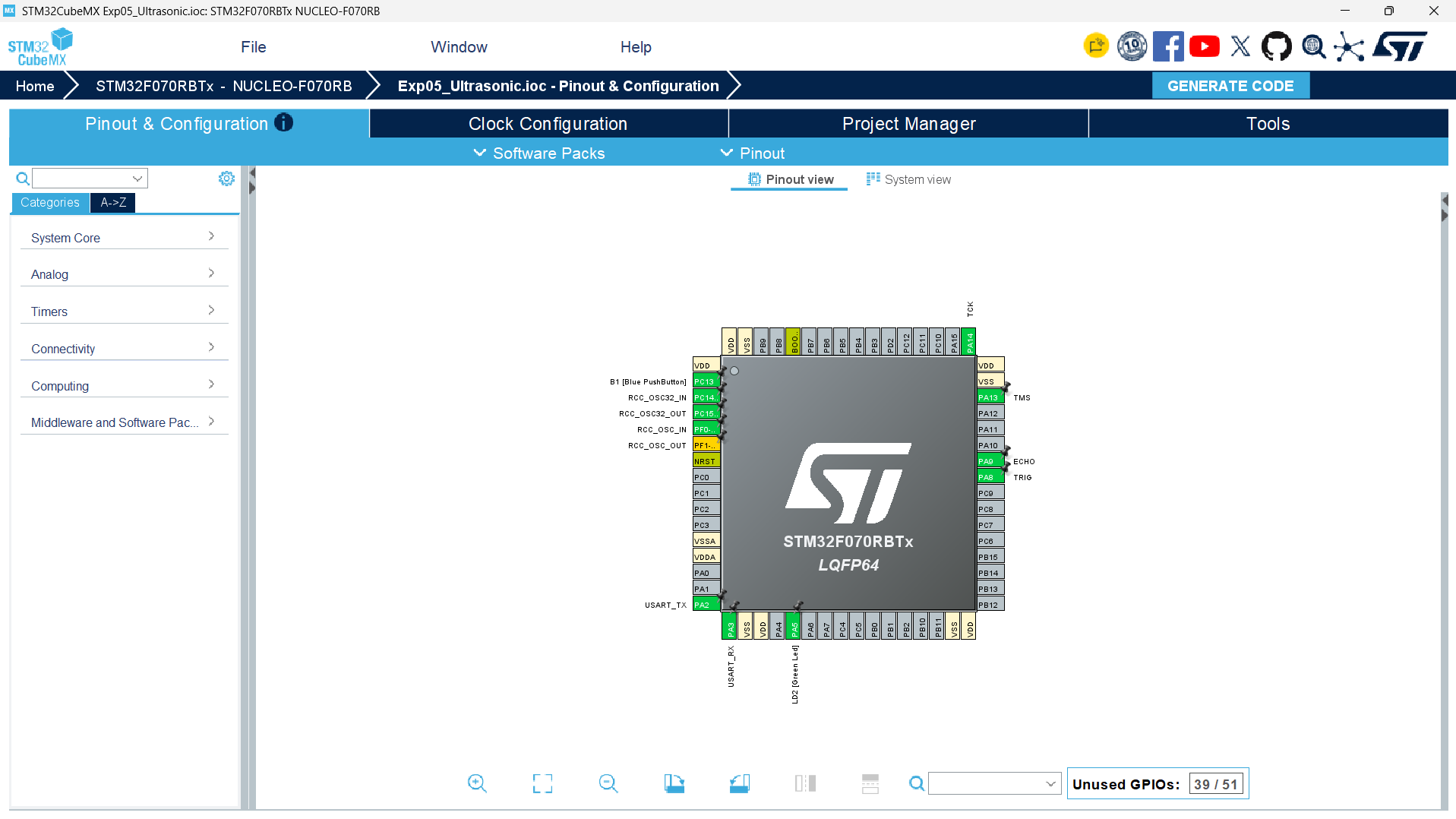
1. Home -> New Project -> ACCESS TO BOARD SELECTOR.
-
2. Search NUCLEO-F070RB -> select it -> Start Project -> click Yes to default init.
-
3. On the Pinout & Configuration tab, click pin PA8 on the chip diagram -> set as GPIO_Output.
-
4. Click pin PA9 -> set as GPIO_Input.
-
5. Expand Timers -> TIM3 in the left tree (remember, this chip has no TIM2). Set Clock Source = Internal Clock, Prescaler (PSC) = 47 (48MHz ÷ 48 = 1MHz → 1 tick = 1µs), Counter Period (ARR) = 65535 (the max for this 16-bit timer, giving us free-running behaviour).
-
6. Confirm USART2 is still Asynchronous, 115200-8-N-1.
-
7. Rename pins via User Label: PA8 -> TRIG, PA9 → ECHO.
-
8. Go to the Project Manager tab. Set Project Name = Exp05_Ultrasonic, pick a folder, set Toolchain/IDE = STM32CubeIDE.
-
9. Click GENERATE CODE.
STM32CubeIDE Configuration
-
1. Open STM32CubeIDE → File → Open Projects from File System → select the Exp05_Ultrasonic folder → Finish.
-
2. Expand Core → Src and double-click main.c.
-
3. Under /* USER CODE BEGIN Includes */, add #include "string.h" and #include "stdio.h".
-
4. Under /* USER CODE BEGIN 2 */ (before the loop), add the one line that starts TIM3, from Section 9.
-
5. Inside the while (1) loop, paste the measurement logic from Section 9 between /* USER CODE BEGIN 3 */ and /* USER CODE END 3 */.
-
6. Important: go to Project → Properties → C/C++ Build → Settings → MCU Settings, and tick “Use float with printf from newlib-nano”, skip this and the %f in our sprintf just won't print correctly.
-
7. Save with Ctrl+S.
-
8. Build: hammer icon or Ctrl+B → confirm 0 errors.
-
9. Connect the board via USB (and wire the HC-SR04 to 5V as shown in Section 4).
-
10. Click Run → Run As → STM32 C/C++ Application (plain Run, not Debug, so there is no pause-and-resume step to get stuck on).
Application Code
/* USER CODE BEGIN Includes */
#include "string.h" // gives access to strlen(), used to find how many characters are in msg
#include "stdio.h" // gives access to functions like sprintf(), used to format text/numbers into strings
/* USER CODE END Includes */
/* Private variables ---------------------------------------------------------*/
TIM_HandleTypeDef htim3;
/* USER CODE BEGIN WHILE */
while (1) // infinite loop, keeps measuring distance forever
{
/* USER CODE END WHILE */
/* USER CODE BEGIN 3 */
uint32_t t1, t2, pulse_us, start; // t1/t2 = timer values marking echo start/end, pulse_us = echo pulse width, start = reference time for trigger pulse
float distance_cm; // will hold the final calculated distance in centimeters
char msg[40]; // buffer to hold the formatted text we print over UART
HAL_GPIO_WritePin(TRIG_GPIO_Port, TRIG_Pin, GPIO_PIN_RESET); // make sure TRIG pin starts LOW (clean starting state before sending a pulse)
HAL_Delay(2); // short pause (2ms) to ensure sensor is settled before triggering
HAL_GPIO_WritePin(TRIG_GPIO_Port, TRIG_Pin, GPIO_PIN_SET); // set TRIG HIGH — this starts sending the ultrasonic pulse out
start = __HAL_TIM_GET_COUNTER(&htim3); // record the current timer count, used to measure exactly 10 microseconds
while ((uint16_t)(__HAL_TIM_GET_COUNTER(&htim3) - start) < 10); // wait here until 10 microseconds have passed (HC-SR04 needs a 10us trigger pulse)
HAL_GPIO_WritePin(TRIG_GPIO_Port, TRIG_Pin, GPIO_PIN_RESET); // set TRIG back LOW — the trigger pulse is done, sensor now sends out the ultrasonic wave
while (HAL_GPIO_ReadPin(ECHO_GPIO_Port, ECHO_Pin) == GPIO_PIN_RESET); // wait here until ECHO pin goes HIGH, meaning the sensor has sent the pulse and is now waiting for it to bounce back
t1 = __HAL_TIM_GET_COUNTER(&htim3); // record timer value the moment ECHO goes HIGH — this is the start of the "listening" window
while (HAL_GPIO_ReadPin(ECHO_GPIO_Port, ECHO_Pin) == GPIO_PIN_SET); // wait here until ECHO pin goes LOW again, meaning the echo was received back
t2 = __HAL_TIM_GET_COUNTER(&htim3); // record timer value the moment ECHO goes LOW — this is the end of the "listening" window
pulse_us = (uint16_t)(t2 - t1); // calculate how long ECHO stayed HIGH, in microseconds — this is how long the sound wave took to travel there and back
distance_cm = pulse_us / 58.0f; // convert time to distance using the sensor's standard formula (58 microseconds per cm round-trip)
sprintf(msg, "Distance: %.1f cm\r\n", distance_cm); // format the distance value into a readable string with 1 decimal place
HAL_UART_Transmit(&huart2, (uint8_t*)msg, strlen(msg), HAL_MAX_DELAY); // send that string out over UART so it shows up in PuTTY
HAL_Delay(200); // short pause before the next measurement, so readings don't flood the terminal too fast
}
}
How the Code Works
This program measures distance using the HC-SR04 ultrasonic sensor by manually timing how long it takes for a sound pulse to travel out and bounce back, using Timer 3 as a precise stopwatch.
Inside the main loop, a set of variables are declared first: t1 and t2 will hold timer readings marking the start and end of the echo pulse, pulse_us will store how long that pulse lasted (in microseconds), distance_cm will hold the final calculated distance, and msg is a buffer used to format the text we eventually print.
The sequence begins by making sure the TRIG pin starts in a clean, known state:
HAL_GPIO_WritePin(TRIG_GPIO_Port, TRIG_Pin, GPIO_PIN_RESET);
HAL_Delay(2);
Setting TRIG LOW and pausing briefly ensures the sensor isn't mid-cycle from a previous reading before we start a new one.
Next, the actual trigger pulse is generated:
HAL_GPIO_WritePin(TRIG_GPIO_Port, TRIG_Pin, GPIO_PIN_SET);
start = __HAL_TIM_GET_COUNTER(&htim3);
while ((uint16_t)(__HAL_TIM_GET_COUNTER(&htim3) - start) < 10);
HAL_GPIO_WritePin(TRIG_GPIO_Port, TRIG_Pin, GPIO_PIN_RESET);
TRIG is set HIGH, which tells the sensor "send out an ultrasonic pulse now." The datasheet for the HC-SR04 specifies this HIGH pulse needs to last at least 10 microseconds — not more, not less — so the code uses the timer as a precise stopwatch to enforce that. __HAL_TIM_GET_COUNTER(&htim3) reads the timer's current count, and start stores what that count was right when the pulse began. The while loop then does nothing except keep checking __HAL_TIM_GET_COUNTER(&htim3) - start until the difference reaches 10, meaning exactly 10 microseconds have passed (since the timer here is configured to tick once per microsecond). Only then does TRIG get set back LOW, ending the pulse.
Once triggered, the sensor sends out the actual ultrasonic wave and raises its ECHO pin HIGH the moment it starts "listening" for the wave to bounce back:
while (HAL_GPIO_ReadPin(ECHO_GPIO_Port, ECHO_Pin) == GPIO_PIN_RESET);
t1 = __HAL_TIM_GET_COUNTER(&htim3);
This loop simply waits — doing nothing — until ECHO actually goes HIGH. The instant it does, the current timer count is captured into t1, marking the exact moment listening began.
while (HAL_GPIO_ReadPin(ECHO_GPIO_Port, ECHO_Pin) == GPIO_PIN_SET);
t2 = __HAL_TIM_GET_COUNTER(&htim3);
Similarly, this loop waits until ECHO drops back LOW — which happens the moment the reflected sound wave is detected back at the sensor. That timer count is captured into t2, marking the end of listening.
With both timestamps captured, the actual travel time is calculated:
pulse_us = (uint16_t)(t2 - t1);
Since ECHO stayed HIGH for the entire round-trip of the sound wave (out to the object and back), subtracting t1 from t2 gives us exactly how many microseconds that round trip took.
That time is then converted into a physical distance:
distance_cm = pulse_us / 58.0f;
This uses the HC-SR04's well-known standard formula: sound travels at roughly 343 meters per second in air, and after accounting for the fact that the pulse travels the distance twice (there and back) and converting units, this works out to approximately 58 microseconds per centimeter of round-trip travel. So dividing the measured time by 58 gives the one-way distance in centimeters directly.
Finally, the result is formatted and sent out:
sprintf(msg, "Distance: %.1f cm\r\n", distance_cm);
HAL_UART_Transmit(&huart2, (uint8_t*)msg, strlen(msg), HAL_MAX_DELAY);
HAL_Delay(200);
sprintf builds a readable string showing the distance rounded to one decimal place, which then gets transmitted over UART2 to show up in PuTTY. The HAL_Delay(200) at the end gives a brief pause before the next reading, keeping the output at a comfortable, readable pace instead of flooding the terminal.
So, following the full flow: send a precise 10 microsecond trigger pulse → wait for the sensor to start listening (ECHO HIGH) → wait for it to stop listening (ECHO LOW) → measure how long that listening window lasted → convert that time into a distance using the sensor's standard formula → print the result → briefly pause → repeat. This entire process happens continuously, giving a fresh distance reading roughly five times per second.
AL_GPIO_WritePin(TRIG_GPIO_Port, TRIG_Pin, GPIO_PIN_RESET);O_WritePin(TRIG_GPIO_Port, TRIG_Pin, GPIO_PIN_RESET);
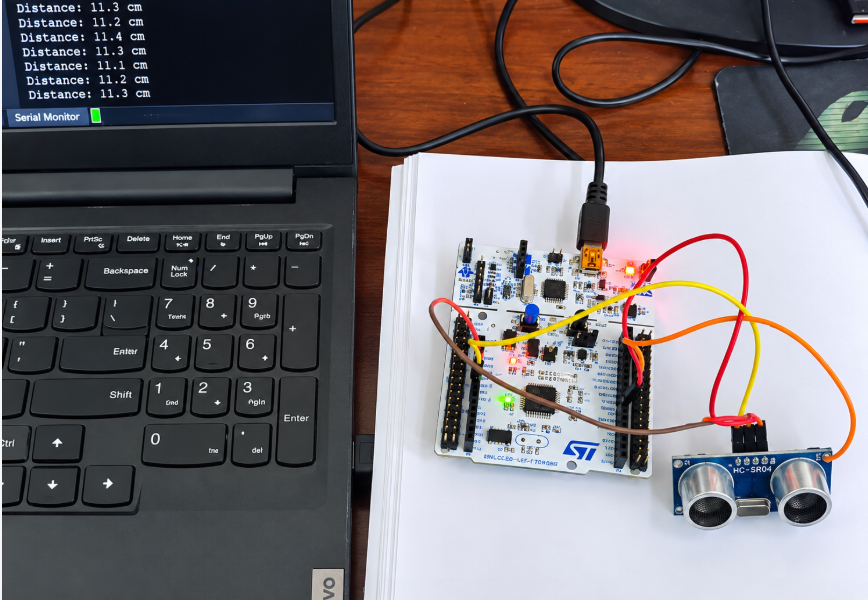
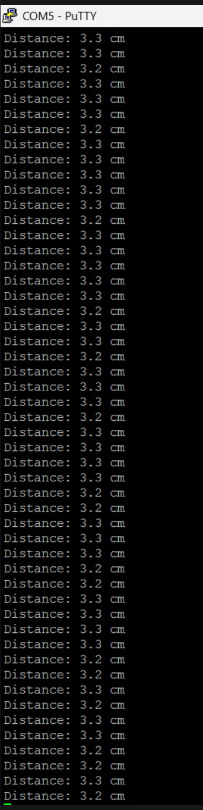
OUTPUT
Experiment Resources
Download the source code, schematics, and required assets to build this project.
Community Q&A
0 questionsAsk questions and get answers from our community and staff moderators.
No questions yet — be the first to start the conversation!
Ask a Question
Please log in to ask a question or post a reply.
Login to Participate